
In Signitic, you can enforce a specific format for displaying phone numbers. This makes it possible to standardize the presentation of numbers in email signatures.
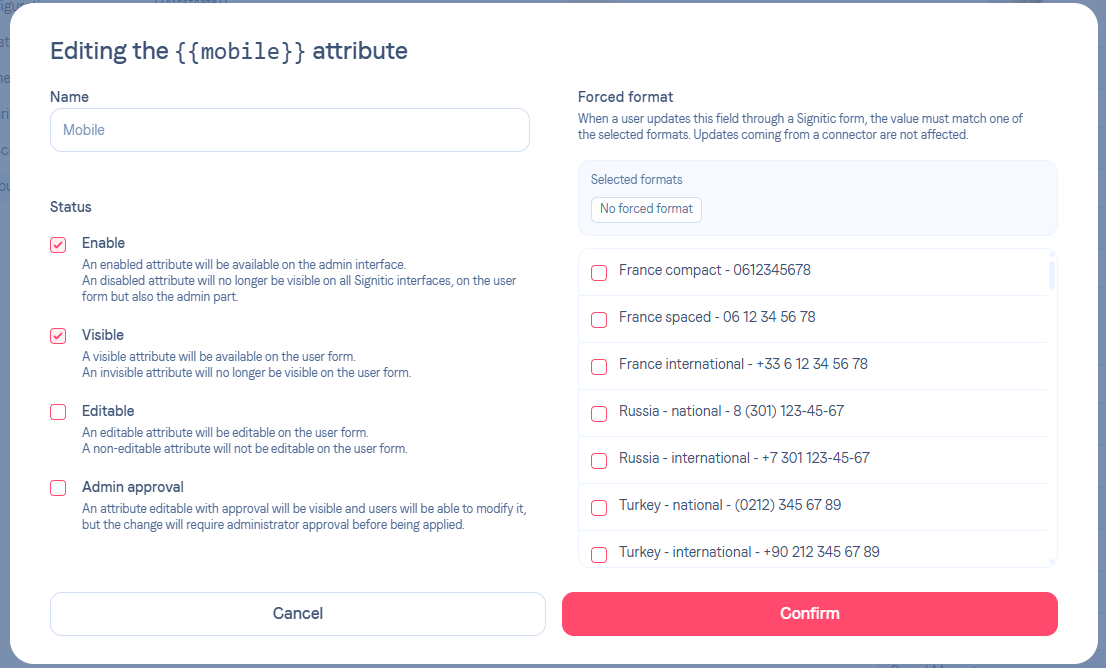
❶ Access the format setting
Open Settings then Attributes in Signitic.
Select the attribute corresponding to the phone (for example Phone or Mobile).
Go to the Edit page of the relevant attribute.
❷ Choose a number format
In the Enforced format section, you can select one or more number formats.
Examples of available formats:
France compact : 0612345678
France spaced : 06 12 34 56 78
France international : +33 6 12 34 56 78
Russia national : 8 (301) 123-45-67
Turkey national : (0212) 345 67 89
Turkey international : +90 212 345 67 89
Select the desired format(s) from the list.
❸ Save the changes
Once the format has been selected:
Click on Confirm to save the changes.
