Help center

Go to Signitic

My signature appears on my personal Gmail account

Guide to removing my signature from my personal Gmail address

When multiple Gmail accounts are open in the same Chrome profile, the Signitic extension may insert your professional signature into messages from your other accounts, including your personal account.

Here are the simple steps to follow to resolve this issue:

info icon
If you want to keep your Gmail accounts in the same Chrome profile, your administrator can allow you to disable automatic signature insertion.

For administrators

  1. Log in to Signitic.

  2. Go to Settings → Connectors.

  3. Open the Browser Extension connector.

  4. Under “Allow users to disable automatic signature insertion”, to allow users to disable automatic insertion, select “
    Allow disabling”.
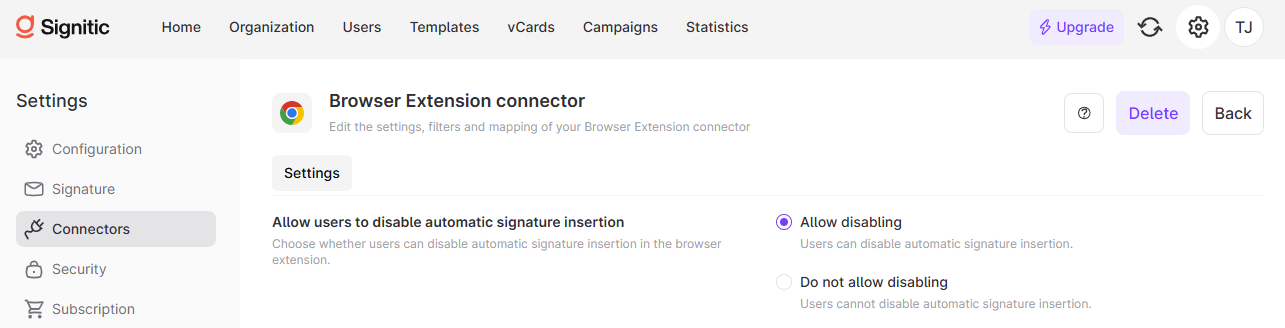
The Browser Extension connector Settings screen in Signitic shows options for allowing users to disable automatic signature insertion, with “Allow disabling” selected. Visible: Signitic, Home, Organization, Users, Templates, vCards.

For users

Once this permission is enabled, open the Signitic extension in your browser and use the option to disable automatic insertion.
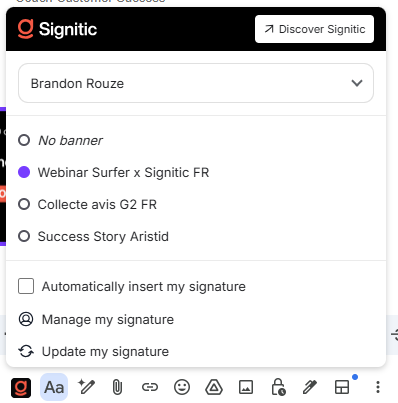
Siginatic signature menu is open, showing the selected Webinar Surfer x Signitic FR signature and signature management options. Visible: Signitic, Discover Signitic, Brandon Rouze, No banner, Webinar Surfer x Signitic FR, Collecte avis G2 FR.

This setting allows automatic insertion to be disabled: it is not a filter that automatically excludes personal addresses or domains @gmail.com.

Did this answer your question?
😞
😐
😁